Network Security - An Introduction
This blogs covers the basic introduction of topics related to Network Security from various resources I used to learn and note my learnings about the topic.
CIA Triad
- Confidentiality
- Integrity
- Availability
DAD Triangles
- Disclosure
- Alteration
- Denial
CIA and DAD are mutually exclusive.
Want the CIA points not the DAD points
Nonrepudiation
Not being able to deny having sent a message
Leads to integrity.
Access Control
Defines the degree of permission granted to a resource
- Identification
- Who is the subject?
- Asserting who you are
- Authentication
- Proof of identity
- The process of verification
- Authorization
- What can be accessed after authentication
Authentication Types
- Something you know
- Something you have
- Something you are
- Multifactor
Authorization Models
- Mandatory
- Discretionary
- Role Based
CWE and CVE
CWE - Common Weakness Enumeration
Relates to vulnerabilities in design flaws,not specific products or systems
cwe.mitre.org
CVE - Common Vulnerabilities and Exposures
Relates to vulnerabilities within specific products,not the underlying flaw.
cve.mitre.org
Data Leakage Prevention(DLP)
- Discovery
- Find the data
- Labelling
- Tag the data
- Policy Creation
- Define data rules
- Content Monitoring
- Watch the data
- Blocking
- Stop the data from leaving
- Reporting
- Report on the offenders
Data Encryption
- Data at Rest
- Storage level encryption
- Data in Motion
- IPSEC,VPN,TLS/SSL
- Data in Use
- Information Rights Management
Data Retention and Disposal
- Valuable part of Policy creation
- Most common methods are
- Disk Wiping
- Degaussinh
- Erasing or reformatting data is not enough
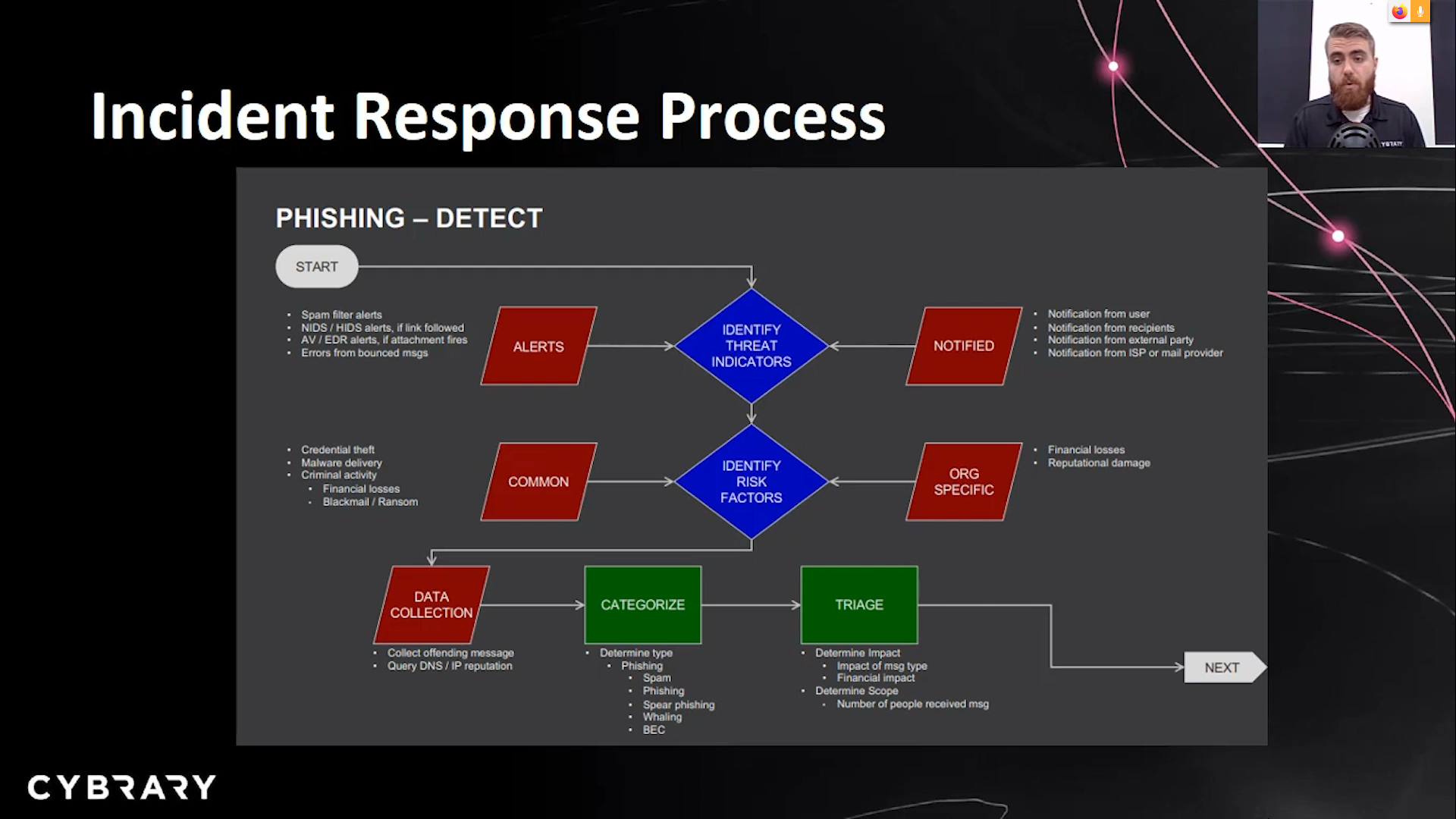
NIST IR Process
- Prepatation
- Detection & Analysis
- Containment Eradication & Recovery
- Post-Incident Activity
Event: Something Happening
Security Incident: A violation or imminent threat of violation of a security policy or practice which can cause significant potential to cause harm
Incident Response Team Members: Management,IT,Handlers,Legal,Counsel,HR,and Public Relations.
Example
Disaster Recovery Plan
DRP: Focuses on the restoration of critical systems after a disaster
- Assests
- Data
- Systems
- Network
- Devices
- Telecom
- Equipment
- Alternatives
- Cold site (cheaper)
- Warm site (infra is already setup)
- Hot site
- Testing
- Checklist
- Structured
- Walkthrough
- Simulation
- Parallel
- Full
- Interruption
Business Continuity Plan
Focuses on continuity of critical business operations
- Business Impact Analysis(BLA)
- Impacts from a business disruption
Focus on:
- MTD: Maximum Tolerable Downtime
- RTO: Recovery Time objective
- RPO: Recovery Point Objective
Risk Management
A risk is a function of the likelihood of a given threat source’s exercising a potential vulnerability,and the resulting impact of that adverse event on the organization.
Overview
Likelihood: The probability that a potential vulnerability may be exercised
Threat Source: Intent and Method targeted at the intentional exploitation of a vulnerability.
Vulnerability: A weakness in system security procedure,designs,controls,or implementation.
Impact: The magnitude of harm that could be caused
Asset: Anything of value that is owned by an organization
Threat Source -> Threat -> Vulnerability -> Adverse Impact -> Risk
NIST RISK Management process
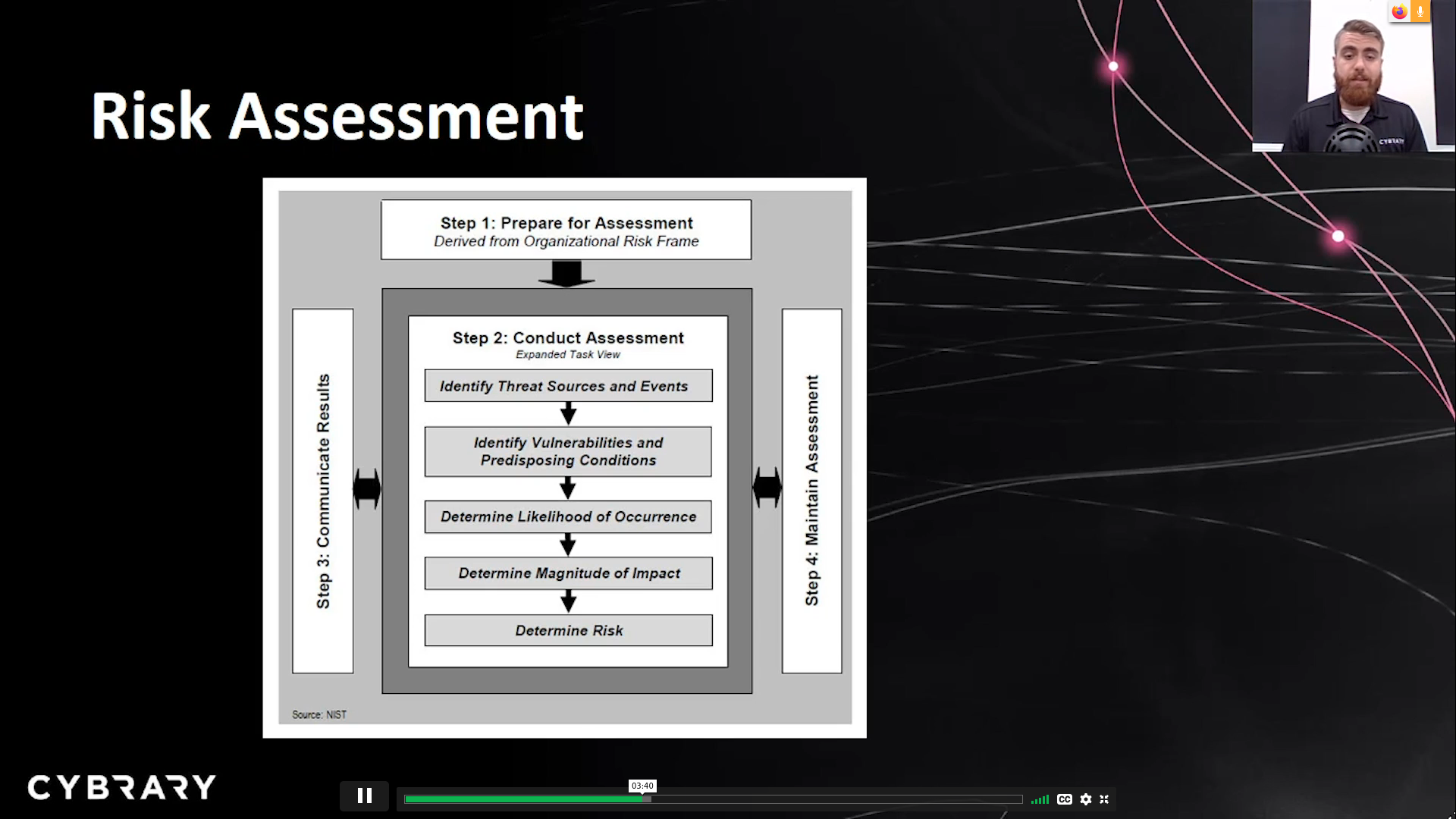
- Impact can be measured in either quantitative or qualitative terms
- Single Loss Expectancy(SLE): Asset Value x Exposure Factor
- Annualized Loss Expectancy(ALE): SLE x Annual Rate of Occurence(ARO)
Network Structure
- Internet
- Intranet(Private Network)
- Extranet(Subset of internet:Third parties)
- DMZ(Demilitarized Zone)
Network Segmentation
- Virtual LANs
- Same switch with different LANs
- Air Gapped Networks
- Guest Networks
Network Topologies
- BUS
- RING
- STAR topology
- MESH
- TREE (bus + star)
- HYBRID(Ring-star topology)
Network Principles
- Least Privilege
- Giving people in the least amount of network access to do their jobs
- Separation of Duties
- Having more than one person required to completed a task
- Dual Control
- Two people required to completed an action at the same time
- Defense-in-Depth
- Overlapping defensive mechanisms to address different attacks
IPSec
- An authenticated and encryption protocol which works at the network layer
Two modes:
- Transport Layer : Data encrypted,but header info is readable
- Tunnel Layer : Data and header info is encrypted
SSL/TLS: Protocol which checks a certificate to ensure server validity
HTTPS: Internet protocol which uses SSL/TLS
SSH: Secure program to access remote computers
Three control categories:
- Management
- Technical
- Operational
Each of these categories withhold 7 other main controls
- Directive control
- Config controls
- Deterrent control
- banners
- Preventative control
- stop login
- Detective control
- chech logs
- Corrective control
- mitigate controls
- Recovery control
- backup,DRP
- Compensating control
- Job rotation and logging
Security Models
Bell-LaPadula Confidentiality Model
Focuses only on Confidentiality aspect
Labels
- Top Secret
- Secret
- Confidential
- Unclassified
Focuses on object,subject and authentication models
Properties
- No read up
- No write down
Biba Integrity Model
Labels same as Bell-LaPadula Model
Properties
- No read Down
- No write up
Clark-Wilson Integrity Model
Focues on object,usersand authentication programs
UDI - Unconstrained data items
IPs - Transformation Procedures
CDIs - Constrained Data Items
IVPs - Integrity verification procedures
Common Attack vectors
Phishing/Spoofing - The process of pretending to be someone or something you are not thorugh false information.
Subset of spoofing is DNS cache poisoning
DOS - An attack which seks to make a machine or network resource unavailable
- subset of DOS is a Deauthenticated attack
MITM - An attack where a person gets in between a normal network conversation and intercepts the traffic
Brute force - A technique where every possible combination is applied
Malicious Insiders - Current or former employees who gain unauthorized access to a network
Web Filtering
- Firewalls
- DMZ
- Access Control Lists
Malware
- Virus
- Malicious software that infects a host file in order to spread
- Logic Bomb
- Executes when certain conditions are met
- Worm
- Malicious software that clones itself in order to spread
- Trojan
- Software that masquerades as something it is not
- Bot
- Malicious code that acts like remotely connected robot
- Rootkit
- Software that enables administrator control of a computer
Malware Countermeasures
- Understandsecurity policies
- backup your data
- update when updates are available
- have good password management
- Use Firewalls and Honeypots
- Use proxy servers and antivirus
Security Practices
- Policy
- High-level document that outlines senior management’s security directives
- Standards
- Compulsory rules that support the security policies
- Procedures
- Step by step instruction for performing a task
- Guidelines
- Suggestion and best practices
- Baseline
- A type of standard that specifies the minimium set of security controls
Policy Format
Objective -> Policy statement -> applicability -> Enforcement -> Roles and responsibilities -> Review
Procedure Components
Purpose -> Applicability -> Steps -> Figures -> Decision point
Change Management
Request submission -> recording -> Impact Assessment -> Decision Making -> Approval -> Status tracking
Network Development Life Cycle
Analysis -> Design -> Simulation Prototyping -> Implementation -> Maaintainance ->A
HIDS and HIPS
IDS - Intrusion detection system tells people if there is an attack taking place.
IPS - Intrusion prevention system tells if there is an attack happening AND tries to avtively stop the attack
Computer Protection Components
- Anti-malware
- Agent that works in seek-and -destroy mode by scanning files or objects
- Host firewall
- Filters traffic coming to and from a computer.Can be considered an IPS
Network Protection Components
NIDS and NIPS
- Network Access Controls
- An access control list which determines which resources are available ona network
- Network Firewall(Hardware based)
- Filters traffic to and from a network
Network Device Hardening
- Change default credentials
- Keep devices up to data
- Use Secure protocols
- Disable unnecessary services
- Disable unused ports