Understanding Docker
In the following series of blogs,I try to explain Docker and the DevOps ecosystem.This is the one of many blog posts to be featuring Docker and many other tools utilized in the ecosystem.
These are notes from my learnings about docker and virtualization.
Docker
- docker is a tool for running applications in an isolated environment
- similar to virtual machine
- app run in same environment
- just works
- standard for software deployement
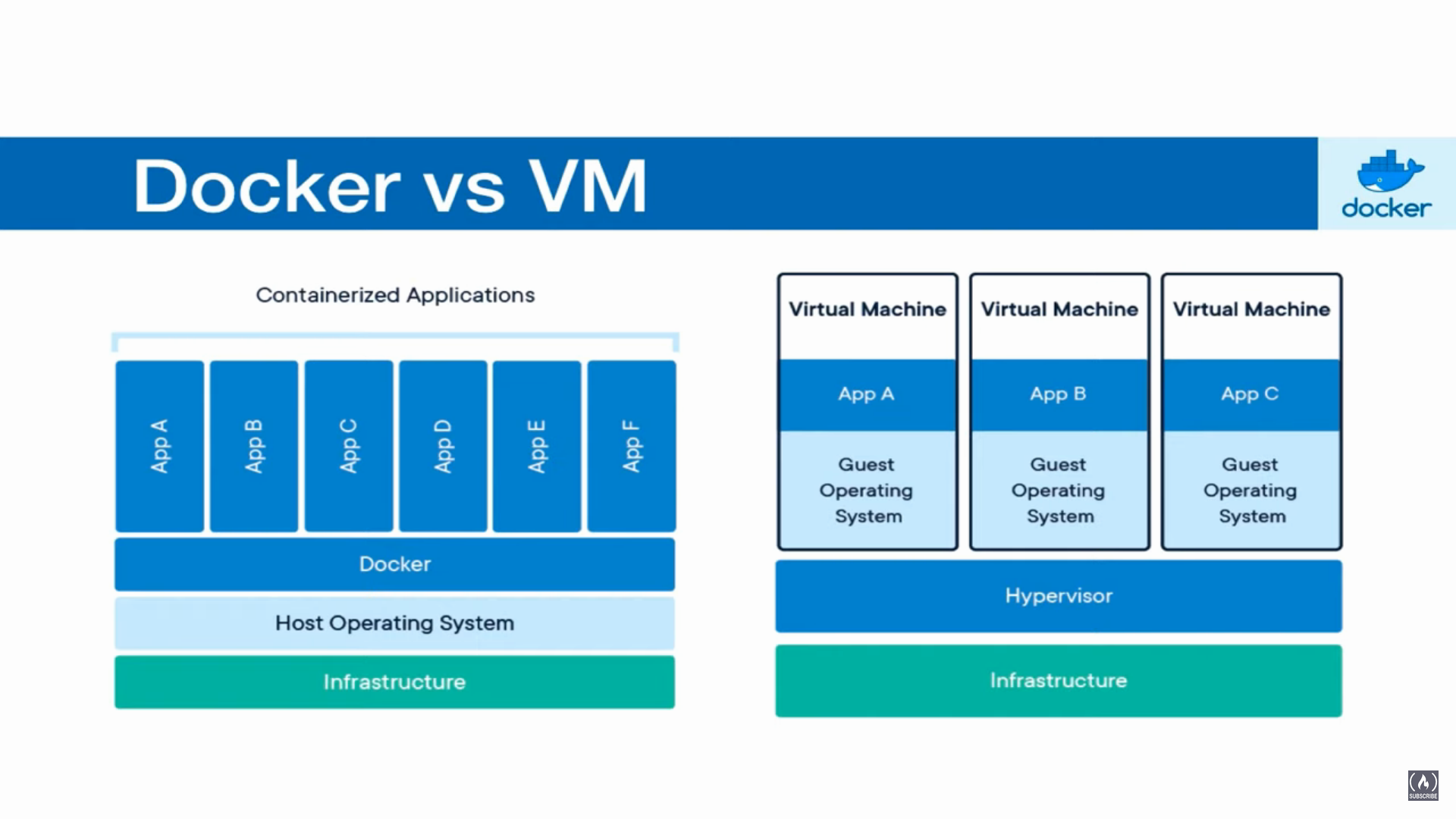
Containers vs VMS
- Containers
- containers are an
abstractionat the app layer that packagecodeanddependenciestogether. - Multiple containers can run on the same machine and share the OS kernel with other contaniers,each running as isolated processes in user space.
- containers are an
- Virtual Machines
- Virtual machines(VMs) are an abstraction of physical hardware turning one
serverintomany servers.The hypervisor allows multiple VMs to run on a single machine. - Each VM includes a full compy of an operation system,the application,necessary binaries and libraries - taking up tems of GBs.VMs can also be slow to boot.
- Virtual machines(VMs) are an abstraction of physical hardware turning one
Docker Image
- Image is a template for creating an environment of your choice
- Snapshot
- Has everything needed to run our apps
- OS,Software,App code
Container
- Running instance of an image
docker container ls

docker ps

docker run nginx

docker run -d nginx:latest # -d to run in detached mode and give you an id

docker stop f0cf93d81c5a # stop with container id
Exposing Ports
we have a container running with nginx on port 80 to connect from our localhost to it we can
docker run -d -p 8080:80 nginx:latest # -p to route requests from port 8080 to 80 of contanier
To expose multiple ports from host to container
docker run -d -p 8080:80 -p 3000:80 nginx:latest
Managing Containers
to stop container and run them again
docker stop nostalgic_ptolemy

docker start nostalgic_ptolemy # id can also be used in place of names
docker ps #only lists running containers
docker ps -a #list all containers
Delete containers
docker rm priceless_ganguly # delete priceless_ganguly

docker rm $(docker ps -aq) # delete all containers using -q for only numeric ids and delete
                            # does not delete running containers

docker rm -f $(docker ps -aq) # force delete running containers with -f
Naming Containers
docker run --name shagun_nginx -d -p 8080:80 -p 3000:80 nginx:latest

docker start shagun_nginx

docker stop shagun_nginx
Volumes
- Allows sharing of data.files & folders
- between host and container
- Between containers
We create a volume in a container and share data between host and container.
docker run -d --name website -v $(pwd):/usr/share/nginx/html -p 8080:80 nginx:latest
Volumes between Containers
docker run --name website-copy --volumes-from website -d -p 8081:80 nginx:latest
Dockerfile
- Build own images
- create Image -> Run Container
- https://docs.docker.com/engine/reference/builder/
Docker Build
docker build --tag website1:latest .
run the build image as a container
docker run --name site -p 8080:80 -d website1:latest
dockerignore
ignore files and folders using .dockerignore
node_modules
Dockerfile
.git
Caching
caching images and order of docker file to improve and cache parts that not often changed and have the changing source code added ad the end so that the dependencies are cahced
Updated Dockefile
FROM node:latest

WORKDIR /app

ADD package*.json ./

RUN npm install

ADD . .

CMD node index.js
Alpine
docker pull node:lts-alpine

#alpine images of node and nginx to use decrease size

docker pull nginx:alpine
Tags,Versioning,Tagging
- Allows you to control image version
- Avoids breaking changes
- Safe
- You have control
Make new tags from existing tags
docker tag yellow-website:latest shagun-website:1
Running containers with different tags
docker run –name one -p 8080:80 shagun-website:1
docker run –name one -p 8080:80 website:latest
Docker Registry
- Highly scalable server side application that stores and lets you distribute docker images
- Used in CI/Cd pipelines
- Run your applications
- Images in host -> Docker registry {Private/Public}
docker tag shagun-website:1  sfetch/website:1

docker tag shagun-website:1  sfetch/shagun-website:2

docker tag shagun-website:1  sfetch/shagun-website:latest

# make 3 tags to push to the registry

# psuh to registry

docker push sfetch/website:1

docker push sfetch/shagun-website:2

docker push sfetch/shagun-website:latest
Remove images
docker rmi sfetch/website:1
Pulling Images
docker pull sfetct/website
Docker Inspect
docker inspect b3f84df5d457 - container ID
[
    {
        "Id": "sha256:b3f84df5d457c7971f0d8169dac9e24eed26732ef7db221ce299a59b787b495c",
        "RepoTags": [
            "shagun-website:1",
            "website:latest",
            "yellow-website:latest",
            "sfetch/shagun-website:2",
            "sfetch/shagun-website:latest",
            "sfetch/website:1"
        ],
        "RepoDigests": [
            "sfetch/shagun-website@sha256:fe0404f54c1a4f33ac3b23b7836c562a584864cf03e5c15f0c2c8e1d9c47a095",
            "sfetch/website@sha256:fe0404f54c1a4f33ac3b23b7836c562a584864cf03e5c15f0c2c8e1d9c47a095"
        ],
        "Parent": "sha256:4efb29ff172a12f4a5ed5bc47eda3596f8b812173cf609cbb489253dad6e737f",
        "Comment": "",
        "Created": "2020-10-23T16:47:33.677922884Z",
        "Container": "",
        "ContainerConfig": {
            "Hostname": "",
            "Domainname": "",
            "User": "",
            "AttachStdin": false,
            "AttachStdout": false,
            "AttachStderr": false,
            "ExposedPorts": {
                "80/tcp": {}
            },
            "Tty": false,
            "OpenStdin": false,
            "StdinOnce": false,
            "Env": [
                "PATH=/usr/local/sbin:/usr/local/bin:/usr/sbin:/usr/bin:/sbin:/bin",
                "NGINX_VERSION=1.19.3",
                "NJS_VERSION=0.4.4",
                "PKG_RELEASE=1"
            ],
            "Cmd": [
                "/bin/sh",
                "-c",
                "#(nop) ADD dir:4459d956b8fe3cfc3ddd79f40bf304bd8c9c559030238b148825a9c3cdcd653d in /usr/share/nginx/html "
            ],
            "ArgsEscaped": true,
            "Image": "sha256:4efb29ff172a12f4a5ed5bc47eda3596f8b812173cf609cbb489253dad6e737f",
            "Volumes": null,
            "WorkingDir": "",
            "Entrypoint": [
                "/docker-entrypoint.sh"
            ],
            "OnBuild": null,
            "Labels": {
                "maintainer": "NGINX Docker Maintainers <[email protected]>"
            },
            "StopSignal": "SIGTERM"
        },
        "DockerVersion": "19.03.8",
        "Author": "",
        "Config": {
            "Hostname": "",
            "Domainname": "",
            "User": "",
            "AttachStdin": false,
            "AttachStdout": false,
            "AttachStderr": false,
            "ExposedPorts": {
                "80/tcp": {}
            },
            "Tty": false,
            "OpenStdin": false,
            "StdinOnce": false,
            "Env": [
                "PATH=/usr/local/sbin:/usr/local/bin:/usr/sbin:/usr/bin:/sbin:/bin",
                "NGINX_VERSION=1.19.3",
                "NJS_VERSION=0.4.4",
                "PKG_RELEASE=1"
            ],
            "Cmd": [
                "nginx",
                "-g",
                "daemon off;"
            ],
            "ArgsEscaped": true,
            "Image": "sha256:4efb29ff172a12f4a5ed5bc47eda3596f8b812173cf609cbb489253dad6e737f",
            "Volumes": null,
            "WorkingDir": "",
            "Entrypoint": [
                "/docker-entrypoint.sh"
            ],
            "OnBuild": null,
            "Labels": {
                "maintainer": "NGINX Docker Maintainers <[email protected]>"
            },
            "StopSignal": "SIGTERM"
        },
        "Architecture": "amd64",
        "Os": "linux",
        "Size": 35069929,
        "VirtualSize": 35069929,
        "GraphDriver": {
            "Data": {
                "LowerDir": "/var/lib/docker/overlay2/cceee39d63a4d049f4f82a0eee4e991de74c09d50f17fa1703abd51933a926d6/diff:/var/lib/docker/overlay2/a9f5054d8a4de96954c96e58ea777b31aec1ec4af9933ce39f8998a576155964/diff:/var/lib/docker/overlay2/e265cd3f604bc940d36e9c37432b915f94e35d5ad726e1d3f9a51e46feeeab59/diff:/var/lib/docker/overlay2/83da5282541b05c4f346a9b84234444ce85bc402d2bd6b91c1d1f9da324dbfa7/diff:/var/lib/docker/overlay2/b3ed230275e69eb2f0250f7fd15995fd73b58d9a5ccb64225b717b4e9a4b1de6/diff",
                "MergedDir": "/var/lib/docker/overlay2/fbed0ff5fbf427f4e225976795f88c88cb22fdc7444f3c1b9873a8b579f6790f/merged",
                "UpperDir": "/var/lib/docker/overlay2/fbed0ff5fbf427f4e225976795f88c88cb22fdc7444f3c1b9873a8b579f6790f/diff",
                "WorkDir": "/var/lib/docker/overlay2/fbed0ff5fbf427f4e225976795f88c88cb22fdc7444f3c1b9873a8b579f6790f/work"
            },
            "Name": "overlay2"
        },
        "RootFS": {
            "Type": "layers",
            "Layers": [
                "sha256:ace0eda3e3be35a979cec764a3321b4c7d0b9e4bb3094d20d3ff6782961a8d54",
                "sha256:4daeb7840e4d32b9ecb42dd0fe663c8d6764185b300f0ab7f3d9192de6071d23",
                "sha256:835f5b67679cbb99736cbc076e8f6b5697bede395da5d7733df4adfec557da88",
                "sha256:d0e26daf1f5822c79e2cd451ecaa07827122498f186706d407fdd69f27a6dced",
                "sha256:8d6d1951ab0a000053f2175df40883b1d2ec1eb8fe216e97f544ec1ea002dd57",
                "sha256:ce08a277a8daf508995dc6bdfa77de5de4530d207837f691723b27b988a5c17b"
            ]
        },
        "Metadata": {
            "LastTagTime": "2020-10-23T23:14:05.485684685+05:30"
        }
    }
]
Logs of Docker Container
docker logs -f b3f84df5d457 # -f allows to follow the requests and update in real time

docker logs --help # for more
Docker Exec
Jump into a container
docker exec -it b3f84df5d457 /bin/sh #i for interactive and t for a tty